Tasks
Status
Different Themes to choose from
Added Ebullientworks Theme
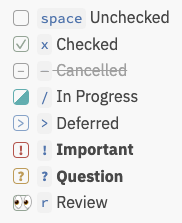
- [-]
-Cancelled - [/]
/In Progress - [>]
>Deferred - [!]
!Important - [?]
?Question - [r]
rReview
Task Search
Here is an example that shows a few different features. View it in Reading or Live Preview modes to see the results.
start with " ```tasks "
# Only tasks that are not done, that is, which begin like this (but without the quotes):
#   '- [ ] ' or
#   '* [ ] ' or
#   '1. [ ] '
# Indented tasks are supported, but only single-line tasks.
not done

# Tasks due today or earlier:
due before tomorrow

# Restrict to at most 100 tasks.
# If you ask Tasks to display many hundreds or thousands of tasks,
# Obsidian's editing performance really slows down.
limit 100

# Group and sort the output:
group by filename
sort by due reverse
sort by description

# Optionally, ask Tasks to explain how it interpreted this query:
explain
Find out more in Queries, and its sub-sections.